
How to watch IPTV with VLC, and what’s missing
VLC plays almost anything, IPTV included. For a quick test, that’s ideal. For everyday TV, though, VLC lacks a few things an IPTV player brings.
Open an M3U link in VLC
- 1Start VLC and choose Media → Open Network Stream (or Ctrl + N).
- 2Paste your provider’s M3U link into the field and click Play.
- 3Open the channel list: View → Playlist (or Ctrl + L). Double-click a channel to start it.
An M3U link looks roughly like this. Here’s where to find yours.
http://tv.example.net/get.php?username=…&password=…&type=m3u_plus
Open an M3U file in VLC
If you have a file ending in .m3u or .m3u8, choose Media → Open File (Ctrl + O) or simply drag the file into the VLC window. More in the guide How to open an M3U file.
What about an Xtream Codes login?
VLC can’t sign in with a server, username and password. You need an M3U link. Most providers give you one if you ask, and it’s often in the same email as the Xtream login.
Where VLC falls short for IPTV
- No TV guide: for IPTV lists, VLC doesn’t show what’s on now or what’s next.
- One long list: with thousands of channels you scroll through a single list. You have to dig out categories, favorites and countries yourself.
- Slow start: large lists take noticeable time to open, every single time.
- No movies and series with covers: movies and episodes show up as plain entries without artwork, descriptions or “Continue watching”.
- No catch-up: you can’t use your provider’s catch-up to watch missed shows in VLC.
For a single link, or to check whether a stream works at all, VLC is still an excellent tool.
The alternative: an IPTV player for Windows
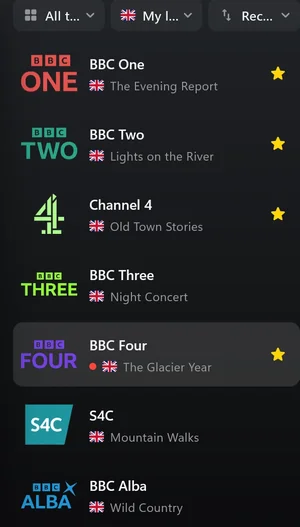
An IPTV player takes the same playlist and turns it into proper TV. Finally, for example, sorts channels into categories, gives each one a clean name and logo, shows the TV guide and remembers your last channel. Movies and series get covers and “Continue watching”. You enter an Xtream login directly, no link needed.
| VLC | Finally | |
|---|---|---|
| M3U link and M3U file | Yes | Yes |
| Xtream Codes login | No | Yes |
| TV guide (EPG) | No | Yes |
| Categories, favorites, search | List and search only | Yes |
| Movies and series with covers | No | Yes |
| Plays almost any format | Yes | Yes, IPTV streams |
| Price | Free | Free, optional Premium |
Questions
Why won’t VLC play my IPTV stream?
Common reasons: the link has expired or was copied incorrectly, the subscription has ended, or your provider allows only one connection at a time and another device is already watching. Check the link and close other players.
Can VLC show a TV guide for IPTV?
No, not for M3U lists. For that you need an IPTV player that loads your provider’s guide data (EPG or XMLTV).
Is VLC safe for IPTV?
VLC itself is, if you download it from the official site. Treat your M3U link like a password, because it contains your login details.
Updated: October 5, 2026