


The best IPTV players for Fire TV and Android TV in 2026
On a TV, the player decides whether IPTV is fun: can you find your channels quickly, do you see what’s on, does it work well with the remote? Here we compare four well-known players for Fire TV, Android TV and Google TV, with honest facts instead of scores.
What matters on a TV
- Your login details: most providers give you an Xtream Codes login (server, username, password) or an M3U link. A good player handles both directly.
- Remote: arrows, OK and Back should be enough. Long typing with the remote should be the exception.
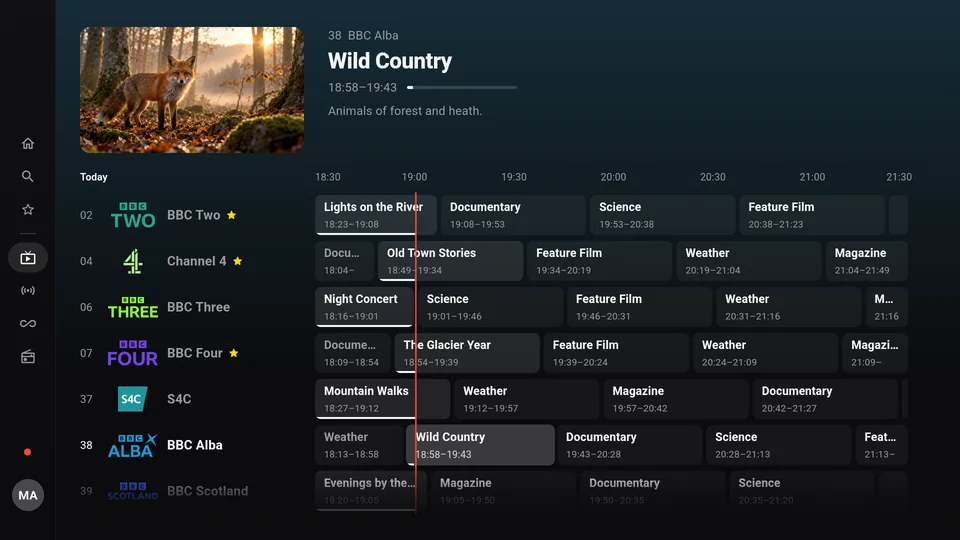
- TV guide (EPG): you want to see what’s on now and what’s up next.
- Installation: on Fire TV, most IPTV players are installed with the Downloader app. On new sticks with Vega OS that no longer works.
Important: an IPTV player is just the playback app. None of them come with channels; those come from your provider.
All players at a glance
| Player | Devices | On Fire TV | Price | Xtream | M3U | TV guide | Catch-up | Multiview | Sync between devices |
|---|---|---|---|---|---|---|---|---|---|
| Finally | Android TV, Google TV, Fire TV, Android phone and tablet, Windows | Via Downloader (Fire OS) | free, PRO from €2.99/month | Yes | Yes | Yes | Yes (PRO) | Yes, 2 (PRO) or 4 (MAX) | Yes, encrypted (PRO) |
| TiviMate | Android TV, Google TV | Via Downloader (Fire OS) | free + premium | Yes | Yes | Yes | Yes | Yes | n/a |
| IPTV Smarters Pro | Android, Android TV, iPhone, iPad, Apple TV, Samsung TV, web, Windows and Mac (beta) | n/a | free + in-app purchases | Yes | Yes | Yes | Yes | n/a | n/a |
| Kodi + IPTV Simple Client | Android, Windows, Mac, Linux, iPhone, Apple TV, Raspberry Pi, webOS | Via Downloader (Fire OS) | free, open source | Only via M3U URL | Yes | Yes (XMLTV) | Yes, if your provider supports it | No | No |
As of October 2026. All details come from the developers’ official sources (website, Google Play Store). “n/a” means we found no official information. Catch-up only works in any player if your provider offers it.
The players in detail
Finally
Good for: anyone who simply wants to watch TV, with a tidy channel list and on several devices.
Strength: Finally is available for TV, phone and PC. Duplicate channels are merged, and every channel gets a clean name and a logo from our catalog. Plus a TV guide from your provider or your own XMLTV source, and a media library with covers, ratings, trailers and “Continue watching”. On your TV, you scan a QR code and add your playlist comfortably on your phone, which also works for free and without an account.
Free and without an account: live TV, TV guide until midnight, search, favorites, parental controls with PIN, one playlist and pausing live TV. PRO costs €2.99 a month or €19.99 a year and adds the full week guide, catch-up, rewinding live TV up to 30 minutes, multiview with 2 channels, 2 playlists, 2 profiles and encrypted sync for up to 5 devices. MAX costs €4.99 a month or €29.99 a year: 10 playlists, 6 profiles, 10 devices, 4 channels at once. No ads, and your data is end-to-end encrypted.
Weakness: Finally isn’t in the Play Store or the Amazon Appstore yet; you install it with Downloader. Finally can’t record yet, and Stalker portals aren’t supported.
TiviMate
Good for: anyone who only watches on the TV and wants a proven player for the remote.
Strength: TiviMate (Armobsoft) is built entirely around Android TV and the remote. It supports M3U, Xtream Codes and Stalker portals, plus a TV guide, catch-up and multiview. The app is free; you buy premium through the “TiviMate Companion” app.
Weakness: According to the Play Store, TiviMate is not optimized for touch devices like phones and tablets. There’s no version for Windows or iPhone. On Fire TV it only installs via Downloader. More: TiviMate alternative.
IPTV Smarters Pro
Good for: anyone looking for a player for lots of different devices, including Apple and Samsung.
Strength: According to the developer, the current “Smarters Pro” app from Tech Smarters is available for Android, Android TV, iPhone, iPad, Apple TV, Samsung TVs and as a web player, with Windows and Mac in beta. Xtream login, TV guide and catch-up are included. The app is free, with in-app purchases.
Weakness: The old Play Store listing has disappeared, and today’s app has a different name. That causes confusion. Check who publishes an app with “Smarters” in its name. More: IPTV Smarters alternative.
Kodi with IPTV Simple Client
Good for: tinkerers who like to set everything up themselves.
Strength: Kodi is free, open source and runs on almost anything, including Fire TV via the Android file. With the IPTV Simple Client add-on, it shows channels with a TV guide from XMLTV, supports catch-up (if your provider does) and rewinding live TV.
Weakness: Setup is technical. Kodi only uses an Xtream login via your provider’s M3U URL. There’s no multiview and no sync between devices.
New Fire TV Stick? Check for Vega OS first
Some new Fire TV Sticks run Vega OS. On those, you can’t install apps from other sources, so not Finally, TiviMate or Kodi via Downloader either. Check what the software says under Settings › My Fire TV › About. What you can do with Vega OS.
Our recommendation
- Only on the TV, with Android TV: TiviMate is proven and made for the remote.
- Apple TV, iPhone or Samsung TV today: IPTV Smarters Pro already runs there.
- Tinkering and setting everything up yourself: Kodi with IPTV Simple Client.
- Simply watch TV, on your TV, phone and PC, with a tidy channel list: Finally. The key features are free.
Install Finally: on Fire TV, on Android TV and Google TV, on your phone.
Questions
What is the best IPTV player for Fire TV?
That depends on what you want. TiviMate is proven if you only watch on the TV. Kodi suits tinkerers. If you want the same channels, favorites and progress on your TV, phone and PC, Finally is a good fit.
Is there a free IPTV player for Android TV?
Yes. Kodi is completely free. You can use Finally, TiviMate and IPTV Smarters Pro for free and extend them with purchases. In Finally, live TV, TV guide until midnight, search, favorites and parental controls are free and need no account.
Can I keep using my playlist in a different player?
Yes. An Xtream login, M3U link or M3U file works in any of these players. Your provider stays the same; you only switch the player. Here’s what login details look like.
Does TiviMate run on phones?
According to the Play Store, TiviMate is not optimized for touch devices like phones and tablets. For phone and TV together, a player built for both is a better fit.
Does an IPTV player include channels?
No. An IPTV player only plays what you give it. The channels come from your provider. Avoid apps that come with channels built in. Is IPTV legal?
Why does IPTV buffer on my Fire TV Stick?
Often it’s the Wi-Fi behind the TV, not the player. An HDMI extension cable or a network adapter helps. More tips against buffering.
Updated: October 24, 2026