


IPTV on Android TV and Google TV: install and set up a player
Many TVs from Sony, TCL, Philips, Hisense and others run Android TV or Google TV, plus boxes like Chromecast with Google TV or Google TV Streamer. Finally runs on them as if made for the remote. Here’s how to set it up.
Does your TV run Android TV or Google TV?
If you see the Google logo when you turn it on and the Google Play Store on the home screen, yes. TVs with their own system, such as Samsung (Tizen) or LG (webOS), don’t count. For those, an inexpensive Google TV box or a Fire TV Stick in the HDMI port helps.
Step 1: Get the Downloader app
Open the Google Play Store on your TV, search for Downloader and install the app by AFTVnews. It’s free.
Step 2: Allow installing from Downloader
- 1Open Settings › System › About.
- 2Press Android TV OS build repeatedly until a message says you’re a developer.
- 3Done. You give the actual permission in a moment, while installing.
On older Android TV devices, go to Settings › Apps › Security & restrictions › Unknown sources and turn on Downloader there.
Step 3: Install Finally
- 1Open Downloader and enter watchfinally.com/apk, or the code from our download page.
- 2If the TV asks for permission: choose Settings, turn on Allow for Downloader, go back and choose Install.
- 3If Play Protect says the app is unknown: Details › Install anyway. This shows up for apps that don’t come from the Play Store.
After that you’ll find Finally among your apps. Best to move it to the front of your home screen.
Step 4: Add your playlist, no typing
On first launch, Finally shows a QR code. Scan it with your phone and enter your login details there: Xtream Codes login, M3U link or M3U file. The TV takes them over by itself. Here’s what each one looks like.
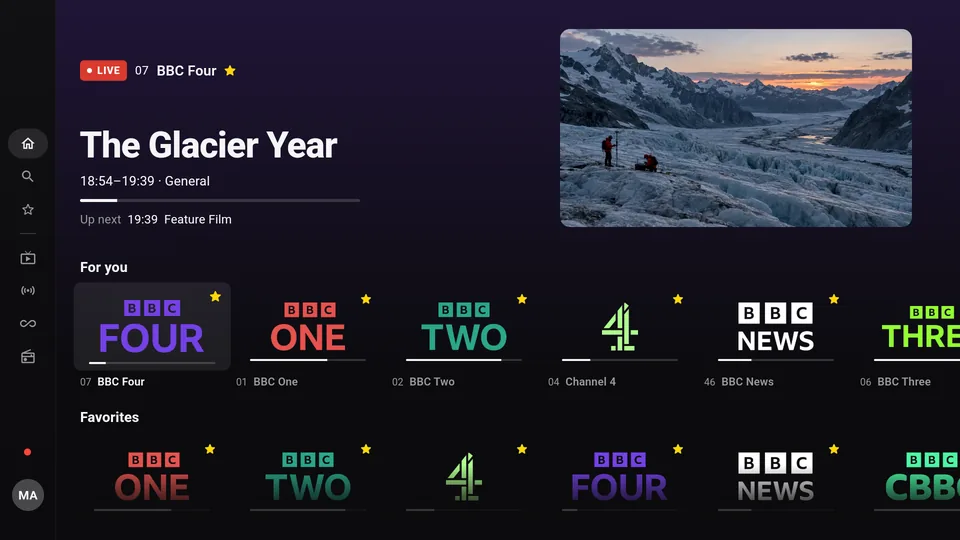
What you get on your TV
- Home screen with what you watched last, your favorites and suggestions.
- TV guide as a timeline, the full week with PRO.
- Media library with movies and series, covers, descriptions and “Continue watching”.
- Channels by number: digits on the remote, just like regular TV.
- Multiview with PRO: two channels at once, four with MAX. Press OK in the player.
Questions
Why isn’t Finally on the Play Store?
Not yet. Until then, you install Finally with Downloader directly from watchfinally.com. Finally tells you about new versions itself.
Does this work on a Samsung or LG TV?
Not directly, because these TVs don’t use Android. Connect a Google TV box or a Fire TV Stick, or cast from your phone with Chromecast.
Does Finally run on a cheap Android box?
Usually yes, as long as it has Android 7 or later. Weak boxes take a little longer the first time they load a large playlist.
Can I bring my playlist over from the PC?
Yes, with an account and PRO. Your playlists, favorites and progress then come to the TV, encrypted. Here’s how it works.
Updated: October 24, 2026