


IPTV player for Android: set up your phone and tablet
With your phone, you can watch IPTV anywhere at home: on the couch, in the kitchen or in bed. And if you like, you send the picture to your TV with one tap. Here’s how to get it running in five minutes.
What you need
- Login details from your provider: Xtream Codes login, M3U link or M3U file. Here’s what each one looks like.
- An Android phone or tablet with Android 7 or later. Practically every device from recent years can do that.
- Wi-Fi or mobile data. About 10 Mbit/s is good for HD. On the go, an hour of HD uses roughly 1 to 3 GB.
Install Finally
Finally comes straight from our website, no app store in between. It takes a minute:
- 1Open watchfinally.com/apk on your phone, ideally in Chrome. The file downloads.
- 2Tap the downloaded file. The first time, Android asks whether Chrome may install apps. Tap Settings and turn on Allow from this source.
- 3Tap Install and open the app.
The permission only applies to Chrome. You can turn it off again after installing. Finally tells you about new versions itself.
Add your playlist
- 1Tap Add playlist.
- 2Choose the type: Xtream Codes, M3U link or M3U file, and enter the details from your provider’s email. The easiest way is to copy them straight from the email.
- 3Wait a moment. Finally loads channels, movies and series, merges duplicate channels and gives each one a clean name and a logo.
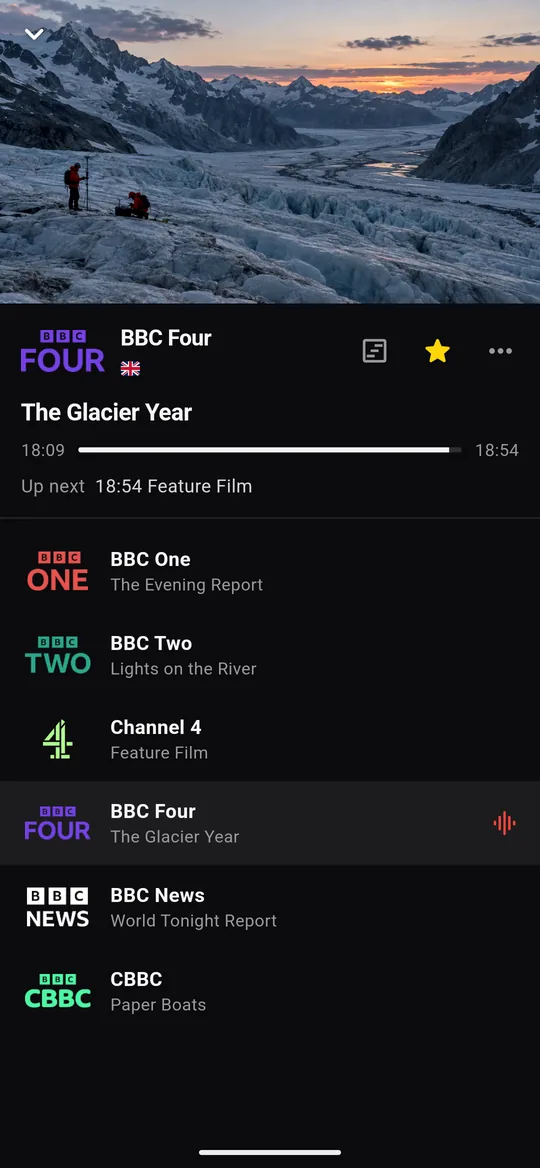
How to use Finally on your phone
- Portrait: the picture on top, below it the channel list with what’s on now. One tap switches the channel.
- Landscape: turn your phone and the picture fills the whole screen.
- The bar at the bottom has Home, Channels, Favorites, Search and “More”. At the top you switch between Live and the media library.
- On your TV: the Cast button at the top of the player sends the picture to a Chromecast or a TV with Google TV. Your phone becomes the remote.
Keep watching on your TV
Finally is also available for Android TV and Google TV, for Fire TV and for Windows. With an account and PRO, your favorites, progress and playlists come along to all your devices, encrypted: started on your phone, continued on your TV. Here’s how it works.
Questions
Why isn’t Finally on the Play Store?
Not yet. Until then, you download Finally directly from watchfinally.com. The file is signed with our key, and updates come from the same place.
Is it safe to install an app from a website?
Yes, if the source is right. Only download Finally from watchfinally.com, not from other sites. You can turn off the permission for Chrome again afterwards.
Does Finally work on tablets too?
Yes. On tablets, Finally uses the bigger screen, and in landscape it’s like a small TV.
Does it buffer on mobile data?
With weak reception it can stutter. Finally then picks a suitable quality by itself, if your provider offers several. More tips against buffering.
Does Finally cost anything?
The basic features are free and need no account: live TV, TV guide until midnight, search, favorites and parental controls. PRO adds multiple playlists, the full week guide, multiview and sync between your devices, among other things.
Updated: October 24, 2026