


The best IPTV players for Windows in 2026, compared
There are plenty of IPTV players for PC, but only a few are actually made for Windows and still maintained. Here are eight programs that run on Windows, with plain facts instead of scores: what they do, what they cost and who they suit.
What matters in an IPTV player for PC
- Your login: Most providers give you an Xtream Codes login (server, username, password) or an M3U link. A good player handles both directly.
- TV guide (EPG): You want to see what’s on now and what’s next, not just a list of names.
- A channel list you can actually use: With thousands of channels, categories, favorites, search and clean names matter more than any extra feature.
- Maintenance: A player that hasn’t been updated in years will sooner or later struggle with new Windows versions and streams.
Keep in mind: an IPTV player is only the playback app. None of them include channels. Those come from your provider.
All players at a glance
| Player | Windows, where to get it | Price | Xtream | M3U | TV guide | Catch-up | Multi-view | Recording | Last updated |
|---|---|---|---|---|---|---|---|---|---|
| Finally | Windows 10 and 11, Microsoft Store | free, PRO from €2.99/month | Yes | Yes | Yes | Yes (PRO) | Yes, 2 (PRO) or 4 (MAX) | Not yet | actively maintained |
| VLC | Installer, Microsoft Store, winget | free, open source | No | Yes | No | No | No | Basic | 3.0.24, Sep 22, 2026 |
| Kodi + IPTV Simple Client | Installer, Microsoft Store, winget | free, open source | Only via M3U URL | Yes | Yes | Yes, with add-on | No | No | 21.3, Oct 31, 2025 |
| IPTV Smarters Pro | Installer from smartersott.app only | free + premium | Yes | Yes | Yes | Yes | n/a | n/a | Windows 1.1.2, date n/a |
| MyIPTV Player | Microsoft Store | free | Yes | Yes | Yes | Yes | No | Partly | May 26, 2026 |
| IPTVnator | Installer, winget | free, open source | Yes | Yes | Yes | Yes | n/a | No | 0.24.0, Sep 24, 2026 |
| Megacubo | Installer (not in the Store) | free + premium, open source | n/a | Yes | Yes | n/a | n/a | Premium only | 17.7.0, Sep 6, 2026 |
| Perfect Player | n/a, developer site no longer active | n/a | n/a | Yes | Yes | n/a | No | n/a | last known: Nov 2022 (Android) |
As of October 2026. All details come from the developers’ official sources (website, GitHub, Microsoft Store, winget). “n/a” means we found no official information. Versions change, and we update this table regularly.
The players one by one
Finally
Good for: anyone who simply wants to watch TV on a PC, with a TV guide and a tidy channel list.
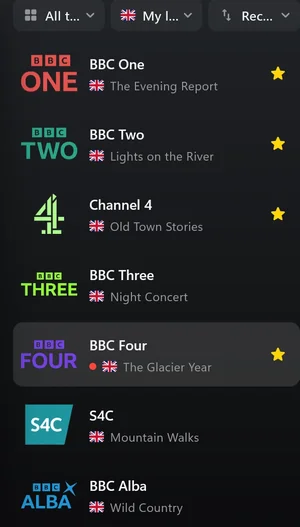
Strength: Finally is built for Windows 10 and 11 and comes from the Microsoft Store. You add an Xtream login, an M3U link or an M3U file, and the TV guide comes in via XMLTV (including .xml.gz). Duplicate channels are merged, and every channel gets a clean name and a logo. Plus keyboard shortcuts, media keys, a mini player, second-screen support and Chromecast.
Free forever, no account needed: live TV, TV guide until midnight, search, favorites, parental lock with PIN and one playlist. PRO costs €2.99 a month or €19.99 a year and adds a full week of TV guide, catch-up (if your provider supports it), live rewind up to 30 minutes, multiview with 2 channels, automatic best quality, 2 playlists, 2 profiles and encrypted sync for up to 5 devices. MAX for the whole household costs €4.99 a month or €29.99 a year: 10 playlists, 6 profiles, 10 devices, 4 channels at once and up to 2 hours of rewind. Your data is end-to-end encrypted, and streams go straight from your provider to you.
Weakness: Finally can’t record yet.
VLC
Good for: quickly testing a single link or opening a stream now and then.
Strength: VLC is free, open source, very mature and plays almost any format. It opens M3U links and M3U files and can do basic stream recording.
Weakness: No TV guide, no Xtream login, no categories. With large playlists you scroll through one long list. More in IPTV with VLC.
Kodi with IPTV Simple Client
Good for: tinkerers and anyone running a living-room PC on the TV.
Strength: Kodi is free, open source and almost endlessly customizable. With the IPTV Simple Client add-on it shows channels with a TV guide and supports catch-up too.
Weakness: Setup takes effort. Kodi only uses an Xtream login through your provider’s M3U URL. The interface is built for a remote, not for mouse and keyboard.
IPTV Smarters Pro
Good for: people who know IPTV Smarters from their phone or TV.
Strength: a well-known name, Xtream login, TV guide and catch-up.
Weakness: The Windows version has barely been maintained for years. It’s only available as a download from smartersott.app. Apps in the Microsoft Store with “Smarters” in the name come from other publishers, not the developer.
MyIPTV Player
Good for: anyone who wants a free player straight from the Microsoft Store.
Strength: free, installs from the Store, Xtream and M3U, TV guide and catch-up.
Weakness: The interface feels dated, recording only works partly, and there’s no multi-view.
IPTVnator
Good for: open-source fans who want an active project.
Strength: free (MIT license), regular updates, Xtream, M3U, TV guide and catch-up.
Weakness: It’s an Electron app, essentially a web page in a window. According to the project, the built-in player is still experimental.
Megacubo
Good for: anyone looking for a long-running open-source program.
Strength: Megacubo has been maintained since 2008 and gets regular updates. M3U and TV guide work, and recording is available in the premium version.
Weakness: There’s no official information on Xtream, catch-up or multi-view. Besides your own lists, Megacubo has a mode with public streams whose scope isn’t clearly described.
Perfect Player
Good for: hardly anyone these days.
Strength: Perfect Player used to be very popular and handled M3U and TV guides.
Weakness: It looks discontinued. The developer’s site is no longer active, and the last known version (for Android) dates from 2022. We wouldn’t pick it for a fresh start.
TiviMate, Televizo & co. on PC
TiviMate and Televizo are among the most popular IPTV players, but they only exist for Android. There’s no Windows version. On a PC they only run inside an Android emulator like BlueStacks, with heavy resource use and an interface built for a remote. That’s why they aren’t in the table. More here: TiviMate for Windows? The alternative.
Our recommendation
- Just play a link now and then: VLC. Free, reliable, set up in seconds.
- Tinker and build a living-room PC: Kodi with IPTV Simple Client.
- Simply watch TV, with a TV guide and a tidy channel list: Finally. The key features are free.
Questions
What is the best IPTV player for Windows?
The best IPTV player for your PC depends on what you need. VLC is enough for playing single links, and tinkerers go for Kodi. If you just want to watch TV on your PC, with Xtream login, TV guide and a clear channel list, a player made for exactly that, like Finally, serves you better.
What is the best free IPTV player for Windows?
Several are free: VLC, Kodi, MyIPTV Player and IPTVnator. Finally is free too and works without an account, with live TV, TV guide until midnight, search, favorites and parental lock. PRO is optional.
Does TiviMate run on a PC?
Not directly. TiviMate is Android only. On a PC it only works through an Android emulator, with the usual drawbacks. A player made for Windows is more comfortable.
Does an IPTV player include channels?
No. An IPTV player only plays what you give it. Channels come from your provider, as an Xtream login, an M3U link or an M3U file. Avoid sites that offer a player “with channels”.
Can I record with an IPTV player on PC?
Some can: VLC in a basic way, MyIPTV Player partly, Megacubo in its premium version. Finally can’t record yet.
Updated: October 8, 2026